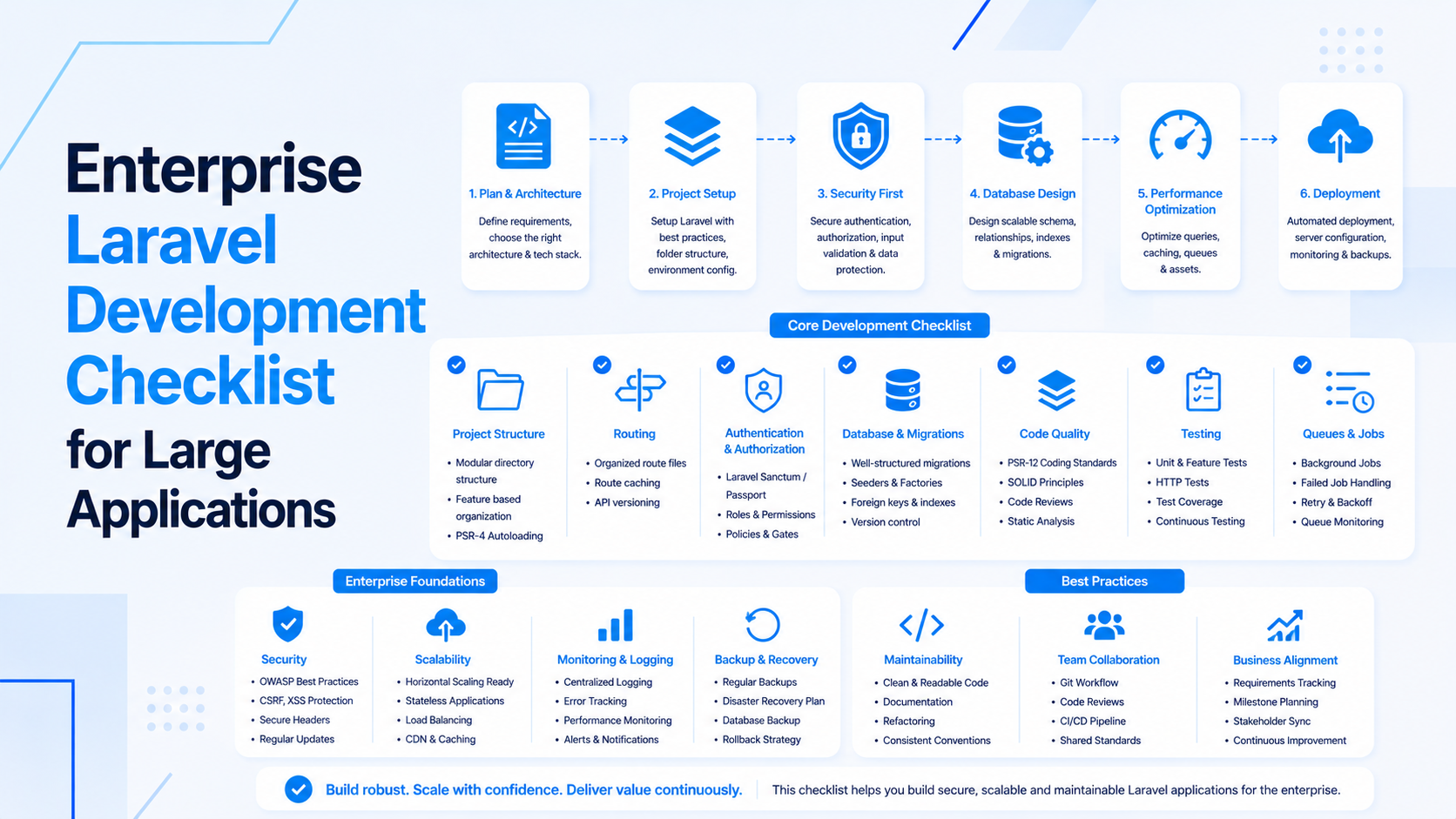
Custom web application development works best when the business problem is clear before screens and features are planned. A custom app should support real workflows, reduce manual work, protect important data, and make operations easier to manage.
This checklist helps business owners prepare for a custom web application project before development starts. It covers users, workflows, roles, integrations, data, dashboards, security, deployment, and support.
Start With The Business Workflow
Before discussing technology, describe the work the application must improve.
- What process is currently slow, manual, error-prone, or difficult to track?
- Which users are involved in the workflow?
- What information moves from one step to another?
- What decisions, approvals, or notifications are required?
- What outcome should be easier after the application is live?
If the project needs complete frontend, backend, database, and deployment ownership, start with full-stack custom web application development.
Define User Roles And Permissions
Most business applications need different access levels. Define them early so the application protects data and keeps screens focused.
- List roles such as owner, admin, manager, staff, customer, vendor, or viewer.
- Define what each role can create, view, update, approve, export, or delete.
- Identify sensitive actions such as billing changes, data exports, account deletion, and user invites.
- Decide whether approvals or audit logs are required.
- Keep the first permission model simple enough to launch.
Map The Core Modules
A custom web app should be organized around real business modules, not a random list of pages.
- Customer or client management.
- Orders, bookings, projects, leads, tickets, tasks, or inventory.
- Admin settings and user management.
- Reports, dashboards, and exports.
- Notifications, email templates, and activity logs.
- Integrations with payment gateways, CRMs, ERPs, marketing tools, or mobile apps.
For Laravel-heavy business systems, review Laravel development services. For API-heavy workflows, include backend API development.
Plan Data And Database Needs
Data quality affects performance, reports, automation, and future integrations.
- Identify important records, relationships, statuses, and lifecycle stages.
- Define required fields and validation rules.
- Decide what data should be searchable, filterable, exportable, or archived.
- Plan audit trails for sensitive business actions.
- Think about import, migration, and cleanup needs before launch.
If the app depends on reporting or large datasets, include database design and optimization early.
Integration Checklist
Custom web applications often need to connect with other systems. Integrations should be scoped carefully because failure handling matters.
- Payment gateways and invoicing tools.
- CRMs, marketing automation, or email platforms.
- Inventory, ERP, accounting, or logistics systems.
- Mobile apps, frontend apps, or partner APIs.
- Webhooks, scheduled syncs, imports, exports, and retry rules.
Good integrations need logs, retries, and support visibility, not just API calls.
Dashboard And Reporting Requirements
Dashboards should support decisions. Avoid filling the first version with charts that nobody uses.
- Define the top operational questions users need answered.
- List metrics, filters, date ranges, and export needs.
- Identify reports that can be generated in the background.
- Check who can see each metric or export.
- Plan slow reports carefully before traffic or data grows.
For frontend dashboards, review React and Next.js development.
Security, Testing, And Deployment
Business applications often handle customer, payment, operational, or private company data. Production readiness should be part of the scope.
- Validate forms, file uploads, and imports.
- Protect admin actions and private records with backend authorization.
- Add tests for critical workflows, permissions, and API behavior.
- Prepare staging, backups, logs, queue workers, and scheduled jobs.
- Document deployment and rollback steps.
If hosting and release management are included, add cloud infrastructure development to the plan.
Questions To Answer Before Development
- What workflow must the first version improve?
- Who are the users and what can each role do?
- Which modules are required for launch?
- Which integrations are must-have and which can wait?
- What data must be imported, exported, audited, or archived?
- Who will approve scope changes and launch decisions?
Final Custom Web App Checklist
- Business workflow and launch outcome are clear.
- User roles, permissions, and sensitive actions are documented.
- Core modules are mapped before UI design begins.
- Database, reporting, and integration needs are planned.
- Security, testing, deployment, and support are included in scope.
- The first release is useful without trying to include every future idea.
If you are planning a custom business application, start with full-stack web application development, then map Laravel, React, API, database, and cloud work into a practical release plan.

Prakash Tank
Full-Stack Architect & Tech Enthusiast. Passionate about building scalable applications and sharing knowledge with the community.