When the LangChain framework emerged in 2023, it quickly became the default library for building LLM-powered applications in Python and JavaScript. However, as software developers began building complex autonomous agents, exception recovery loops, and multi-step business automation systems, LangChain's linear architecture hit natural limits. To solve this, the LangChain team introduced LangGraph.
This technical guide explains the architectural differences between LangChain and LangGraph, helping software architects choose the right framework for their production AI applications.
1. LangChain: The Linear Pipeline (DAG)
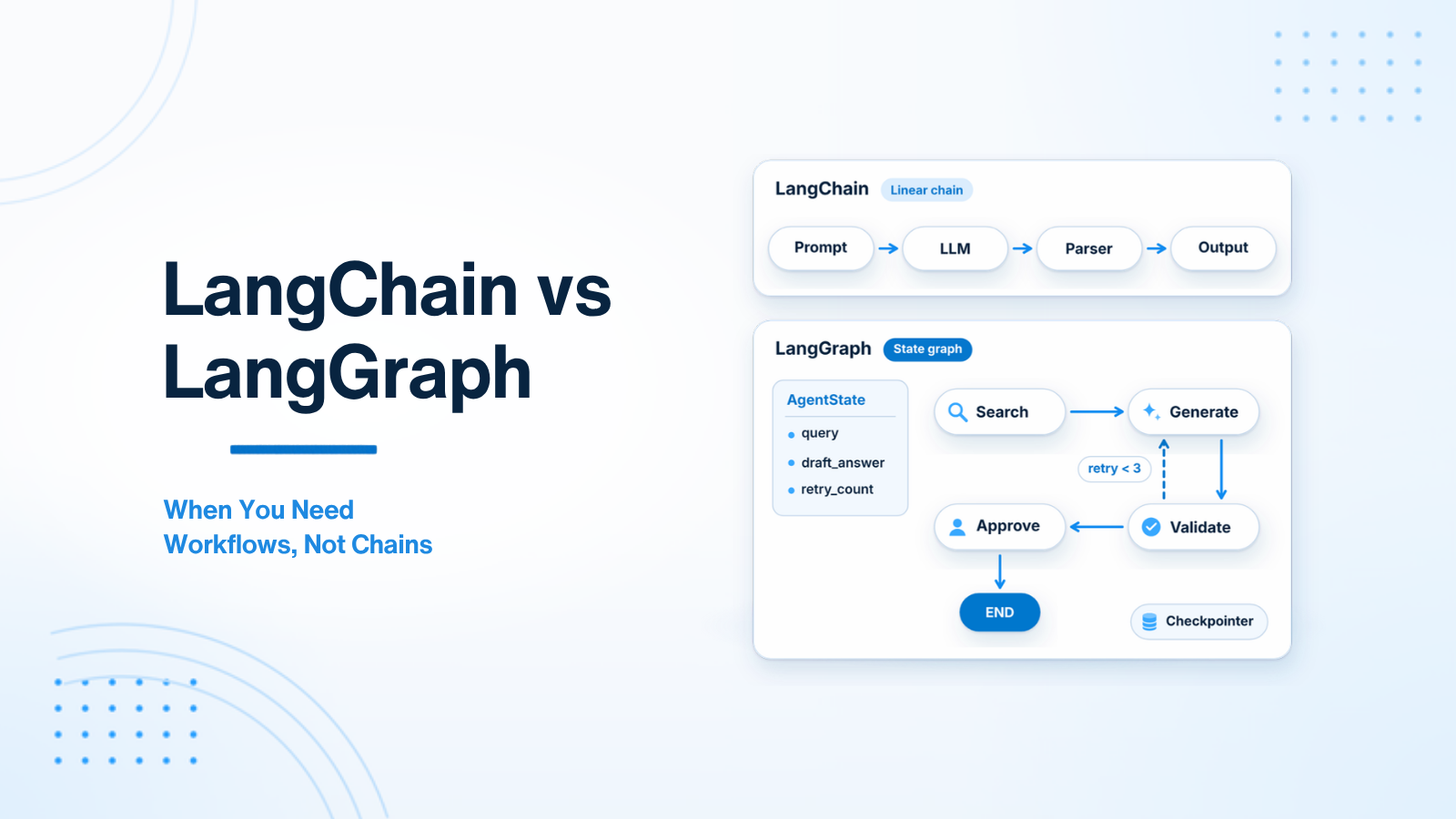
LangChain's core mental model is built around the Chain — a Directed Acyclic Graph (DAG) where data flows strictly in one direction from input to output.
A standard LangChain Expression Language (LCEL) chain looks like this:
User Query → Retriever → Prompt Template → LLM -> Output Parser → HTTP ResponseLCEL makes composing sequential pipelines concise and readable:
# Standard LangChain LCEL Sequential Chain
chain = prompt | llm | StrOutputParser()
result = chain.invoke({"topic": "FastAPI async performance"})
When LangChain Is Perfect:
- Predictable Linear Workflows: Standard RAG search, document summarization, sentiment classification, or language translation where the sequence of execution steps is always identical.
- Simple Pipeline Composition: When you need standardized wrappers for document loaders, text splitters, vector stores, and output parsers.
2. Where Linear Chains Fall Short
Sequential chains become fragile and unmaintainable when your application requires dynamic decision making, loops, and state memory. Consider these real-world requirements:
- Conditional Branching: The LLM's initial response determines whether to query a database, execute a web search, or ask the user for clarification.
- Self-Correction Loops: An agent generates SQL code, executes it against a test database, catches a syntax error, feeds the error back to the LLM, and retries up to 3 times.
- Human-in-the-Loop Checkpoints: A workflow generates a customer refund document, pauses execution, waits 2 hours for a human manager to click "Approve" in a dashboard, and then resumes execution.
- Multi-Agent Collaboration: A Manager agent delegates sub-tasks to a Researcher agent and a Writer agent, synthesizing their outputs.
All of these scenarios require cycles (loops) and state persistence, which linear chains cannot represent cleanly. Attempting to hack loops into standard LangChain creates unmaintainable, hard-to-debug code.
3. LangGraph: Applications as Stateful Directed Graphs
LangGraph reframes AI application architecture: instead of a linear pipeline, your application is a State Machine represented as a Directed Graph.
Core Concepts in LangGraph:
- State: A central typed dictionary that accumulates data and is passed to every node in the graph.
- Nodes: Python functions that execute logic (LLM calls, tool executions, API requests) and return updates to the State.
- Edges: Connections between nodes. Conditional Edges inspect the current State to dynamically decide which node executes next.
- Checkpointers: Persistence engines (SQLite, PostgreSQL, Redis) that save the graph's State after every node execution. This enables long-running workflows and human approval pauses.
from langgraph.graph import StateGraph, END
from typing import TypedDict, Literal

# 1. Define Central State Schema
class AgentState(TypedDict):
    query: str
    search_results: list[str]
    draft_answer: str
    retry_count: int

# 2. Define Node Functions
def search_node(state: AgentState) -> dict:
    results = execute_vector_search(state["query"])
    return {"search_results": results, "retry_count": state.get("retry_count", 0) + 1}

def generate_node(state: AgentState) -> dict:
    answer = call_llm(state["query"], state["search_results"])
    return {"draft_answer": answer}

# 3. Define Conditional Routing Function (Evaluates State to choose next step!)
def evaluate_results(state: AgentState) -> Literal["generate", "retry_search", "fail"]:
    if not state["search_results"] and state["retry_count"] < 3:
        return "retry_search" # LOOP BACK!
    elif not state["search_results"]:
        return "fail"
    return "generate"

# 4. Construct LangGraph Workflow
workflow = StateGraph(AgentState)
workflow.add_node("search", search_node)
workflow.add_node("generate", generate_node)

workflow.set_entry_point("search")

# Add Conditional Edge (Enables Cycles & Branching)
workflow.add_conditional_edges("search", evaluate_results, {
    "generate": "generate",
    "retry_search": "search", # Cycles back to search node!
    "fail": END
})
workflow.add_edge("generate", END)

app = workflow.compile()
4. Architectural Decision Matrix
| Requirement / Architectural Pattern | Use LangChain | Use LangGraph |
|---|---|---|
| Standard RAG Question-Answering Pipeline | YES (Clean & Simple) | Overkill |
| Simple Document Summarizer / Classifier | YES | Overkill |
| Self-Correcting Code Generation (Loops & Retries) | No | YES (Essential) |
| Human-in-the-Loop Approval Checkpoints | No | YES (Native Interrupts) |
| Multi-Agent Manager/Worker Orchestration | No | YES (Industry Standard) |
| Long-Running Resumable Workflows (Days/Weeks) | No | YES (PostgreSQL Checkpointing) |
5. State Persistence and Time-Travel Debugging
One of LangGraph's most impressive features is built-in Time-Travel Debugging. Because state checkpointers persist every graph step into PostgreSQL or Redis, developers can inspect the exact state of an agent at step N, modify the state payload, and re-execute execution from that point forward. This makes debugging complex multi-agent failures significantly easier than inspecting traditional monolithic logs.
6. Production Telemetry and Graph Observability
Monitoring complex state machine graphs requires tracing data flows across individual node executions. Standard log statements quickly become unmanageable when diagnosing failures in looping or multi-agent graphs. Integrating observability platforms (such as LangSmith, Phoenix, or OpenTelemetry) captures visual execution graphs, node execution latencies, state mutations, and token costs per step.
7. Building Self-Correcting Code Generators in LangGraph
One of the most effective production use cases for LangGraph is building Self-Correcting Code and Query Generators. In traditional linear chains, if an LLM generates a SQL query with a syntax error, the execution fails, and an HTTP error is returned to the user.
8. Memory Strategies: Short-Term Thread Memory vs Long-Term Vector Memory
Advanced AI agents require two distinct memory subsystems to simulate human-like conversational intelligence across product sessions: Short-Term Thread Memory (preserves chat context) and Long-Term Vector Memory (stores user preferences across sessions).
9. Deploying LangGraph Services to Production with Docker
Deploying stateful LangGraph graph applications to cloud infrastructure requires containerizing the Python runtime. Create a multi-stage Dockerfile utilizing lightweight Python base images and high-performance ASGI web servers (like Uvicorn).
7. Building Self-Correcting Code Generators in LangGraph
One of the most effective production use cases for LangGraph is building Self-Correcting Code and Query Generators. In traditional linear chains, if an LLM generates a SQL query with a syntax error, the execution fails, and an HTTP error is returned to the user.
In a LangGraph state machine, the execution flow handles syntax errors autonomously:
- Generator Node: The LLM generates a candidate SQL query based on user request and database schema context.
- Execution & Validation Node: The application executes the SQL query inside a read-only database transaction. If the query succeeds, execution proceeds to the Output Node.
- Error Feedback Edge (Loop): If database execution throws a SQL syntax error, the error traceback is saved into the State dictionary. Execution routes back to the Generator Node, passing the exact database error string to the LLM for self-correction.
- Retry Guardrail: A conditional edge checks
retry_count < 3to prevent infinite execution loops if the error cannot be resolved.
# Conditional routing for self-correcting SQL execution loop
def check_sql_execution(state: SQLAgentState) -> str:
    if state["is_valid_sql"]:
        return "format_output"
    elif state["retry_count"] < 3:
        return "regenerate_sql" # Cycle back to fix query!
    else:
        return "fallback_error"
8. Memory Strategies: Short-Term Thread Memory vs Long-Term Vector Memory
Advanced AI agents require two distinct memory subsystems to simulate human-like conversational intelligence across product sessions:
Short-Term Thread Memory: Preserves conversational history within a single session using LangGraph state checkpointers. Every message, tool call, and system response is appended to the thread state, allowing the agent to follow pronouns ("What was his invoice total?") within the active conversation.
Long-Term Vector Memory: Stores user preferences, historical interactions, and past support resolutions across sessions. When a user starts a new conversation three weeks later, a background retrieval step searches a long-term vector database for past user preferences, injecting relevant historical memory into the new thread context.
9. Deploying LangGraph Services to Production with Docker
Deploying stateful LangGraph graph applications to cloud infrastructure requires containerizing the Python runtime. Create a multi-stage Dockerfile utilizing lightweight Python base images (like python:3.11-slim) and high-performance ASGI web servers (like Uvicorn or Gunicorn with uvicorn workers).
Configure persistent database connections for LangGraph checkpointers using PostgreSQL connection pools (such as psycopg3 async connection pools). Deploying containerized LangGraph services behind AWS Application Load Balancers (ALB) or Kubernetes deployments guarantees high availability and automatic horizontal scaling based on incoming request metrics.
10. Event-Driven Agent Streaming with Server-Sent Events (SSE)
In modern web user interfaces, waiting 15 seconds for a complex multi-step state graph to finish execution causes degraded user experience. Streaming state graph updates in real time using Server-Sent Events (SSE) keeps the interface responsive.
The frontend React or Livewire component listens to the SSE stream, rendering intermediate agent thoughts, search indicators, and progress bars as each graph node completes execution.
11. Event-Driven Agent Streaming with Server-Sent Events (SSE)
In modern web user interfaces, waiting 15 seconds for a complex multi-step state graph to finish execution causes degraded user experience. Streaming state graph updates in real time using Server-Sent Events (SSE) keeps the interface responsive. The frontend React or Livewire component listens to the SSE stream, rendering intermediate agent thoughts, search indicators, and progress bars as each graph node completes execution.
12. Enterprise Governance & Distributed Tracing Integration
Deploying state machine graph architectures across enterprise software organizations requires strict governance and auditability. Grouping agent node executions into typed state dictionaries enables centralized telemetry logging. Tracing platforms (such as OpenTelemetry, Datadog APM, or LangSmith) record node latencies, state transitions, and tool calls, allowing engineering teams to audit multi-agent interactions and maintain security compliance.
Conclusion
Use LangChain for simple, linear LLM pipelines. Choose LangGraph when your AI application requires state persistence, conditional branching, self-correction loops, human approval gates, or multi-agent collaboration.
Building complex AI agents or LangGraph workflows? Visit AI Agent Development or Hire AI Developer.

Prakash Tank
Full-Stack Architect & Tech Enthusiast. Passionate about building scalable applications and sharing knowledge with the community.