A single AI agent equipped with a few tools can automate simple, linear tasks. However, complex real-world business processes — such as automated B2B sales lead processing, multi-stage legal contract reviews, or complex customer support escalations — are rarely linear. They require specialized division of labor, exception handling loops, human manager approvals, and multi-agent coordination.
This is where Multi-Agent Architectures built with LangGraph become the standard software paradigm. This technical guide explains how to design, build, and deploy multi-agent automation systems in production.
1. Why Multi-Agent Systems Beat Single-Agent Prompts
Attempting to build a complex multi-step automation using a single "mega-prompt" forces one LLM context to simultaneously act as a domain researcher, financial analyst, compliance officer, and document author. This overloads the prompt context window, increases hallucination rates, and makes debugging almost impossible when steps fail.
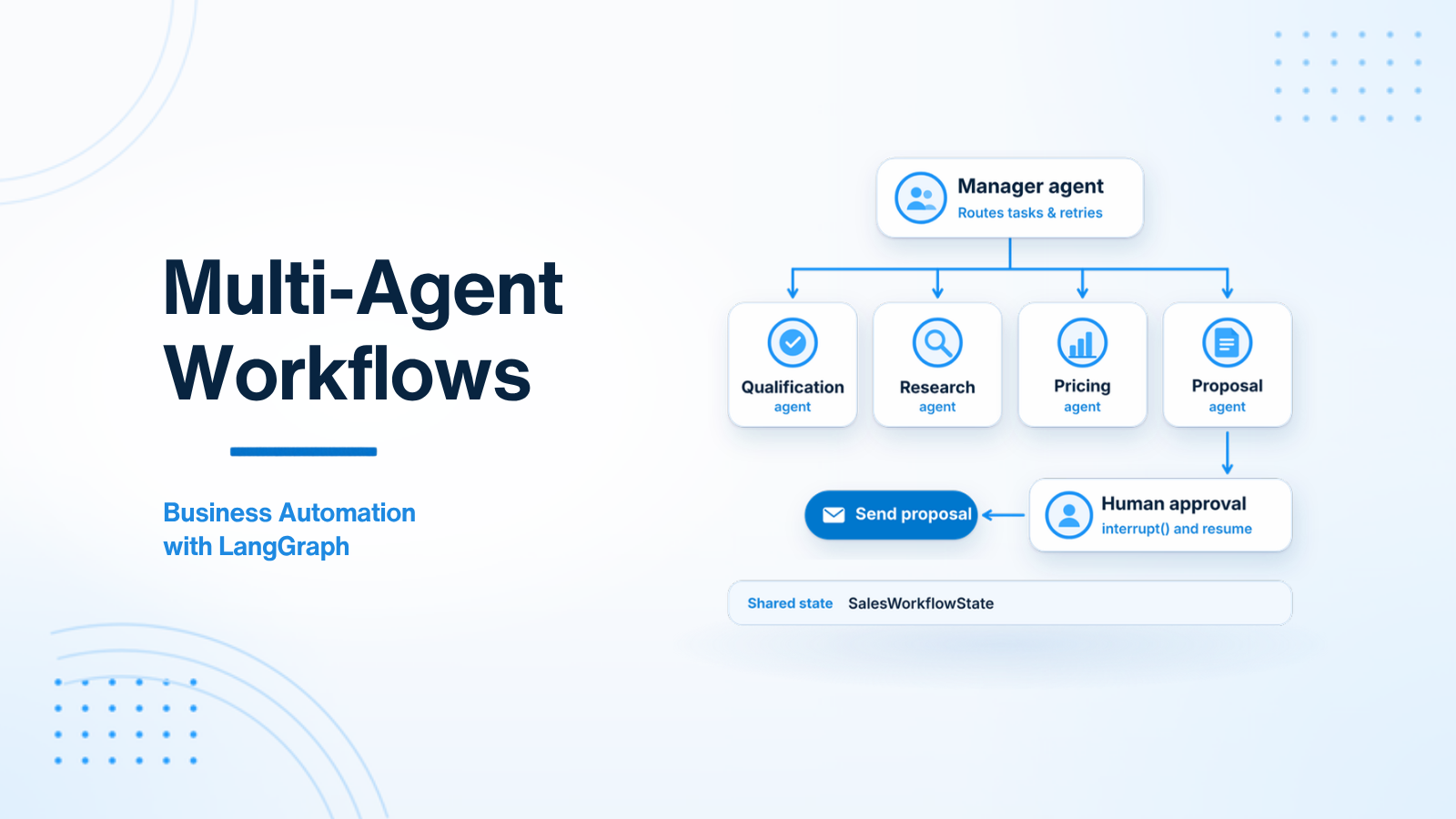
A Multi-Agent Architecture applies standard separation of concerns: it breaks a complex process into small, specialized agents coordinated by a Manager agent:
- Qualification Agent: Analyzes incoming lead data against Ideal Customer Profile (ICP) rules.
- Research Agent: Executes web searches and domain lookups to enrich lead records.
- Pricing Agent: Calculates custom tier pricing based on business rules.
- Proposal Agent: Drafts formatted PDF sales proposals.
- Manager Agent (Orchestrator): Evaluates state, routes tasks between agents, handles retries, and triggers human approval gates.
Each agent has a focused system prompt, a narrow tool set, and a simple responsibility — making the overall system robust, modular, and easy to test.
2. LangGraph Manager/Worker State Machine Pattern
LangGraph represents multi-agent workflows as a State Machine Directed Graph. Agents update a shared central state object, while conditional edges determine which agent executes next.
from langgraph.graph import StateGraph, END
from typing import TypedDict, Optional

# 1. Shared Central Workflow State
class SalesWorkflowState(TypedDict):
    inquiry_text: str
    lead_score: Optional[dict]
    company_research: Optional[dict]
    proposal_draft: Optional[str]
    human_approved: bool
    retry_count: int

# 2. Node Functions (Specialized Agents)
def qualification_agent(state: SalesWorkflowState) -> dict:
    score = analyze_lead_icp(state["inquiry_text"])
    return {"lead_score": score}

def research_agent(state: SalesWorkflowState) -> dict:
    research = perform_company_lookup(state["inquiry_text"])
    return {"company_research": research}

def proposal_agent(state: SalesWorkflowState) -> dict:
    draft = generate_proposal(state["lead_score"], state["company_research"])
    return {"proposal_draft": draft}

# 3. Manager Routing Logic (Conditional Edges)
def route_after_qualification(state: SalesWorkflowState) -> str:
    if not state["lead_score"].get("qualified", False):
        return END # Unqualified lead — stop workflow cleanly
    return "research"

# 4. Construct LangGraph Workflow
builder = StateGraph(SalesWorkflowState)

builder.add_node("qualify", qualification_agent)
builder.add_node("research", research_agent)
builder.add_node("draft_proposal", proposal_agent)

builder.set_entry_point("qualify")

builder.add_conditional_edges("qualify", route_after_qualification, {
    "research": "research",
    END: END
})
builder.add_edge("research", "draft_proposal")
builder.add_edge("draft_proposal", END)

workflow = builder.compile()
3. Human-in-the-Loop Interrupt Checkpoints
Enterprise automation requires human oversight before executing external actions (e.g. sending proposals, issuing refunds, signing contracts). LangGraph provides native Interrupt Checkpoints that pause execution, persist state, and wait for human UI approval.
from langgraph.types import interrupt

def human_approval_node(state: SalesWorkflowState) -> dict:
    # Execution pauses here! State is persisted to PostgreSQL database.
    human_response = interrupt({
        "task": "Review Sales Proposal Draft",
        "proposal": state["proposal_draft"],
        "instructions": "Approve to send or submit feedback for revision."
    })

    if human_response["action"] == "approve":
        return {"human_approved": True}
    else:
        return {
            "human_approved": False,
            "revision_feedback": human_response["feedback"]
        }
When the workflow hits interrupt(), LangGraph saves the state to PostgreSQL and releases server memory. Hours or days later, when a manager clicks "Approve" inside your Laravel/React web dashboard, your API sends a resume command, and LangGraph resumes execution from the exact paused node.
4. Exception Handling & Self-Correction Retries
Multi-agent workflows operating in non-deterministic environments must handle unexpected tool failures or invalid schema outputs. Implementing conditional loop-backs in LangGraph allows nodes to evaluate state errors, increment retry counters, and attempt self-correction up to predefined retry ceilings before triggering manual support alerts.
5. Real-World Case Study: B2B Sales Lead Automation Pipeline
Examining a production B2B lead processing pipeline demonstrates the power of multi-agent state machines in enterprise software. Incoming form submissions are processed by an Ingestion Agent, enriched by a Research Agent using web search tools, evaluated against ICP criteria by a Qualification Agent, priced by a Calculation Agent, and formatted by a Proposal Agent. Introducing human approval checkpoints before emailing sales proposals guarantees 100% precision while automating 90% of operational workflow overhead.
6. Multi-Agent State Management & Sub-Graph Nesting
As multi-agent systems expand to automate complex enterprise workflows, organizing all agent nodes within a single monolithic graph becomes unmaintainable. LangGraph solves this by supporting Sub-Graph Nesting.
7. Deploying LangGraph Multi-Agent Systems to Production
Deploying multi-agent state machine graphs to commercial production environments requires persistent database checkpointers, asynchronous background job workers, and telemetry monitoring pipelines.
5. Real-World Case Study: B2B Sales Lead Automation Pipeline
To understand the power of multi-agent state machines in enterprise software, examine a production B2B Sales Lead Processing pipeline built with LangGraph and FastAPI:
- Lead Ingestion Node: Receives a new lead submission webhook from a web form.
- Research Agent Node: Uses web search tools to look up the company's employee count, tech stack, and recent funding rounds, updating the State dictionary.
- Qualification Agent Node: Evaluates enriched lead data against Ideal Customer Profile (ICP) criteria. If unqualified, routes directly to the Archive Node.
- Pricing Calculation Agent Node: Calls internal pricing API tools to calculate custom enterprise tier estimates based on employee size.
- Proposal Generator Agent Node: Synthesizes research and pricing data to draft a personalized PDF sales proposal.
- Human Approval Gate Node: Execution pauses. An email alert is dispatched to an account executive with a dashboard link to review the draft.
- Dispatch Node: Upon human approval, the sales proposal is automatically emailed to the prospect.
6. Multi-Agent State Management & Sub-Graph Nesting
As multi-agent systems expand to automate complex enterprise workflows, organizing all agent nodes within a single monolithic graph becomes unmaintainable. LangGraph solves this by supporting Sub-Graph Nesting.
Software developers can encapsulate focused agent teams into reusable sub-graphs (e.g. a dedicated "Research Sub-Graph" containing three specialized search and scraper agents). The primary Manager graph invokes the Research Sub-Graph as a single node, passing sub-state inputs and receiving compiled summary outputs. This modular architecture mirrors standard microservice software design.
7. Deploying LangGraph Multi-Agent Systems to Production
Deploying multi-agent state machine graphs to commercial production environments requires persistent database checkpointers, asynchronous background job workers, and telemetry monitoring pipelines. Use PostgreSQL checkpointers (via langgraph-checkpoint-postgres) to ensure state graph steps persist reliably across server restarts.
Integrate open-source tracing libraries (such as OpenTelemetry or LangSmith) to record node execution durations, tool argument payloads, and token consumption metrics per graph execution run. Having visual execution trace graphs allows backend developers to pinpoint failing nodes and optimize multi-agent workflow performance effectively.
8. State Graph Checkpointing with PostgreSQL Persistence
Operating enterprise multi-agent workflows in commercial software environments requires robust state persistence across server restarts, deployments, and background worker failures. LangGraph provides first-party PostgreSQL checkpointers that serialize state graph dictionaries into relational SQL tables after every single node execution.
9. Multi-Agent Communication Protocol Patterns
In complex multi-agent architectures, agents communicate using structured messaging protocols. Rather than passing unformatted free-text strings between agents, define typed message contracts (such as Pydantic models or JSON schemas) that mandate specific communication fields.
10. Enterprise Multi-Agent Governance & Authorization Boundaries
Deploying multi-agent business automation systems across enterprise organizations requires strict role authorization enforcement. Ensure that worker agents execute tools strictly within the authenticated permission scope of the initiating user session, preventing autonomous agents from accessing administrative functions without explicit authorization.
11. Production Deployment Architecture & High Availability
Deploying multi-agent LangGraph workflows to commercial production environments requires persistent database checkpointers, asynchronous queue workers, and load-balanced microservices. Hosting containerized LangGraph services behind AWS Application Load Balancers (ALB) with PostgreSQL state persistence guarantees high availability, sub-second API responsiveness, and zero data loss during server failovers.
12. Security Isolation for Multi-Agent Tool Execution
Granting worker agents access to execute external API tools introduces security vectors if agents are improperly scoped. Enforce least-privilege tool access controls, validating that worker agents execute tools strictly within the permission scope of the initiating user session to maintain enterprise security boundaries.
13. Real-World Enterprise Automation Case Study
Examining a production B2B lead processing pipeline demonstrates the power of multi-agent state machines in enterprise software. Incoming form submissions are processed by an Ingestion Agent, enriched by a Research Agent using web search tools, evaluated against ICP criteria by a Qualification Agent, priced by a Calculation Agent, and formatted by a Proposal Agent. Introducing human approval checkpoints before emailing sales proposals guarantees 100% precision while automating 90% of operational workflow overhead.
Conclusion
Multi-agent architectures built on LangGraph transform complex, non-linear business processes into robust automated state machines. Combining specialized agents, human approval gates, state persistence, and self-correction loops enables enterprise engineering teams to automate complex business workflows with safety and precision.
Designing a multi-agent business automation workflow? Visit AI Agent Development or Hire AI Developer.
12. Security Isolation for Multi-Agent Tool Execution
Granting worker agents access to execute external API tools introduces security vectors if agents are improperly scoped. Enforce least-privilege tool access controls, validating that worker agents execute tools strictly within the permission scope of the initiating user session to maintain enterprise security boundaries.
13. Real-World Enterprise Automation Case Study
Examining a production B2B lead processing pipeline demonstrates the power of multi-agent state machines in enterprise software. Incoming form submissions are processed by an Ingestion Agent, enriched by a Research Agent using web search tools, evaluated against ICP criteria by a Qualification Agent, priced by a Calculation Agent, and formatted by a Proposal Agent. Introducing human approval checkpoints before emailing sales proposals guarantees 100% precision while automating 90% of operational workflow overhead.

Prakash Tank
Full-Stack Architect & Tech Enthusiast. Passionate about building scalable applications and sharing knowledge with the community.