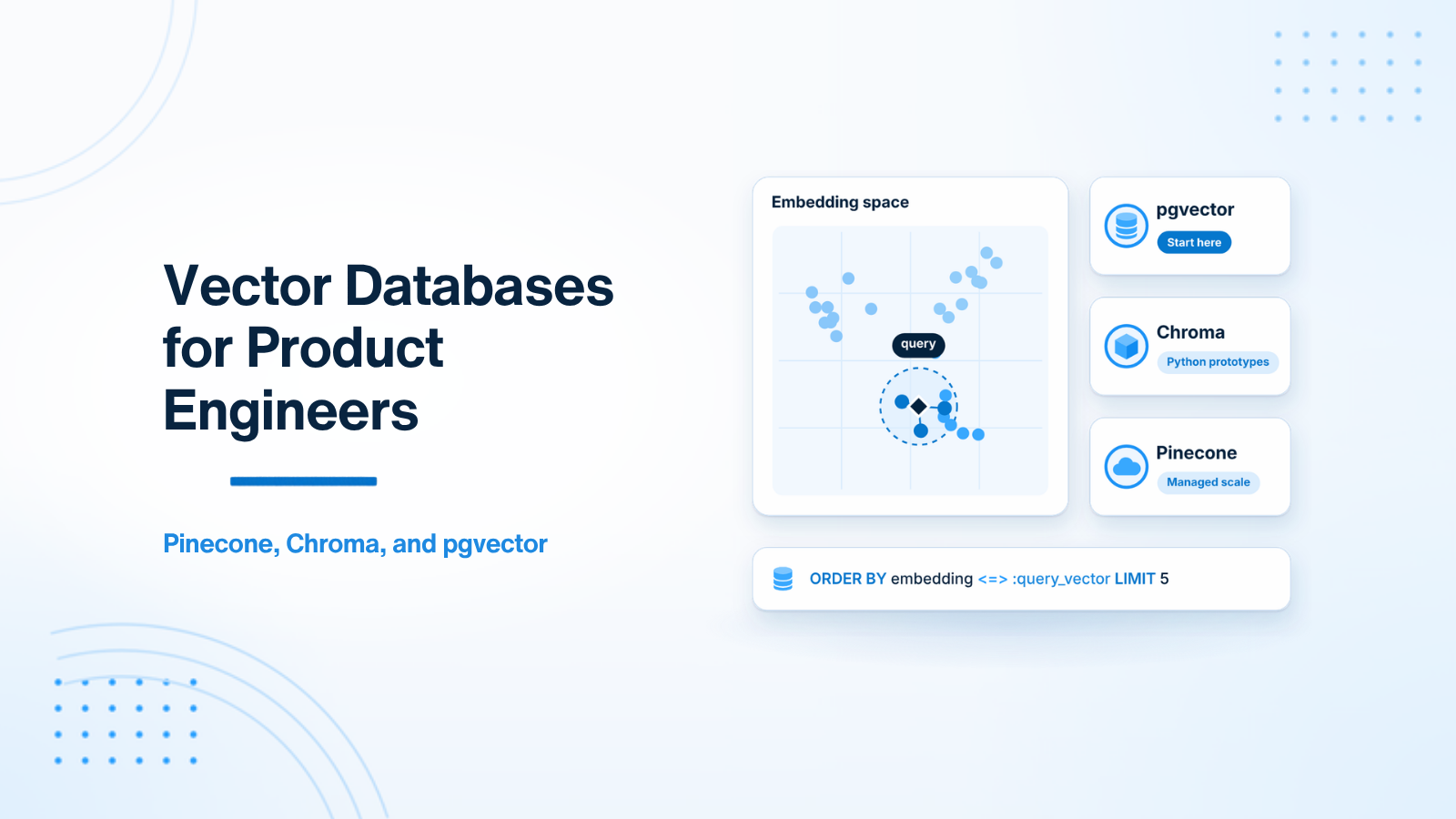
When backend software engineers start building RAG pipelines, semantic search engines, or AI recommendation features, they immediately encounter the vector database landscape. With dozens of options — Pinecone, Chroma, pgvector, Weaviate, Qdrant, Milvus — selecting the right vector database can feel overwhelming. For product developers (as opposed to infrastructure researchers), the decision comes down to evaluating operational complexity, SQL join capability, performance at scale, and long-term infrastructure cost.
This guide provides product engineers with a clear, honest comparative analysis of the three most practical options: pgvector, Chroma, and Pinecone.
1. What Vector Databases Do
A vector database stores high-dimensional embedding vectors (arrays of numbers representing text meaning) and executes Approximate Nearest Neighbor (ANN) search algorithms (like HNSW or IVFFlat) to quickly find vectors closest to a query vector based on distance metrics (Cosine Similarity, Dot Product, or Euclidean Distance).
Standard relational databases without specialized extensions cannot index or query high-dimensional vector arrays efficiently across millions of records. That is the specialized gap vector engines fill.
2. Head-to-Head Comparison Matrix
| Evaluation Dimension | pgvector (PostgreSQL) | Chroma (Open-Source) | Pinecone (Cloud Managed) |
|---|---|---|---|
| Infrastructure Type | PostgreSQL Extension | Self-Hosted Server / In-Memory | Fully Managed Serverless Cloud |
| Operational Complexity | Zero (Uses existing Postgres) | Low to Medium | Zero (SaaS API) |
| Native SQL Joins | YES (Full relational power) | No | No |
| ACID Transactions | YES | No | No |
| Scale Ceiling | Up to ~10 Million vectors | Up to ~5 Million vectors | Billions of vectors |
| Cost Structure | Free (Uses existing database) | Free (Self-hosted server cost) | Pay per vector stored & per query |
| Best Fit For | 90% of product web apps | Python AI prototypes / FastAPI | Enterprise multi-million vector scale |
3. Option 1: pgvector (PostgreSQL Extension) — The Default Choice
pgvector is an open-source extension that adds a native vector column data type and similarity operators to PostgreSQL. It enables running vector search directly inside your existing PostgreSQL database.
Why pgvector Is the Best Default Choice:
- Zero Extra Infrastructure: If your application uses PostgreSQL (AWS RDS, Supabase, Cloud SQL, Railway, DigitalOcean), enable pgvector with one command:
CREATE EXTENSION vector;. No new services to monitor, deploy, or pay for. - Full SQL Power & Joins: Combine vector similarity search with standard SQL
WHEREclauses, user tenant IDs, date ranges, and relational table joins in a single query. - ACID Transactions: Vector inserts participate in standard database transactions. If a transaction rolls back, orphan vectors are not left behind.
-- Creating pgvector table with HNSW index in PostgreSQL
CREATE EXTENSION IF NOT EXISTS vector;

CREATE TABLE chunk_embeddings (
    id SERIAL PRIMARY KEY,
    user_id INT REFERENCES users(id),
    content TEXT,
    embedding vector(1536) -- 1536 dimensions
);

-- Fast HNSW index creation for cosine similarity
CREATE INDEX ON chunk_embeddings USING hnsw (embedding vector_cosine_ops);

-- Single SQL Query: Tenant filter + Vector similarity search!
SELECT id, content, 1 - (embedding <=> '[0.012, -0.045, ...]'::vector) AS similarity
FROM chunk_embeddings
WHERE user_id = 42 -- Strict tenant isolation!
ORDER BY embedding <=> '[0.012, -0.045, ...]'::vector
LIMIT 5;
4. Option 2: Chroma — The Python AI Specialist
Chroma is an open-source vector database designed specifically for Python LLM applications. It offers a simple API and integrates natively with Python frameworks like LangChain and LlamaIndex.
When to Consider Chroma:
- Your primary backend is a dedicated Python FastAPI service.
- You need a lightweight in-memory vector store for unit tests or local development prototypes.
- You do not require complex SQL table joins.
5. Option 3: Pinecone — The Enterprise Cloud Serverless Engine
Pinecone is a fully managed cloud vector database SaaS. You create a vector index via an API endpoint, upsert vectors, and query without managing any database servers.
When to Consider Pinecone:
- Your dataset scales beyond 10 million vectors and requires sub-50ms latency across massive search volume.
- You have dedicated budget for cloud SaaS infrastructure and prefer not to tune PostgreSQL HNSW index parameters.
6. Practical Recommendation for Product Teams
For 90% of product developers building RAG features or semantic search: Start with pgvector. Using your existing PostgreSQL database eliminates operational complexity, keeps billing simple, and allows powerful SQL metadata filtering. Migrate to a specialized vector database like Pinecone only when concrete performance metrics prove that pgvector is an actual system bottleneck.
7. HNSW vs IVFFlat Indexing in pgvector
Understanding index types is critical for optimizing vector search latency in pgvector. HNSW indexes deliver higher query recall accuracy and faster search speed compared to IVFFlat indexes.
8. Multi-Tenant Vector Partitioning Strategies
Enforcing strict tenant isolation inside vector databases using metadata filters or separate PostgreSQL schemas guarantees physical data isolation for enterprise compliance.
9. Cost Analysis at 10M+ Vector Scale
Self-hosting vector search using pgvector inside existing PostgreSQL instances incurs zero extra SaaS billing fees while scaling to millions of embedded vector chunks.
7. HNSW vs IVFFlat Indexing in pgvector
Understanding index types is critical for optimizing vector search latency and memory usage in pgvector. pgvector supports two primary vector index types: HNSW (Hierarchical Navigable Small World) and IVFFlat (Inverted File Flat).
| Index Metric / Behavior | HNSW Index | IVFFlat Index |
|---|---|---|
| Query Search Speed | Ultra-Fast (Sub-10ms) | Fast (10ms - 50ms) |
| Build Speed | Slower build time | Faster build time |
| RAM Memory Footprint | Higher RAM usage | Lower RAM usage |
| Recall Accuracy | 95%+ High Recall | Requires lists tuning for high recall |
| Index Creation Requirement | Can build on empty tables | Requires populated data before building |
Recommendation: Use HNSW for almost all production workloads. It delivers higher query recall accuracy, faster search speed, and can be created on empty tables before data insertion.
8. Multi-Tenant Vector Partitioning Strategies
In enterprise B2B SaaS applications, multiple customer organizations store data within shared PostgreSQL database clusters. Ensuring strict tenant data isolation inside vector databases requires clear architectural strategy:
- Relational Metadata Partitioning (Default): Include a
tenant_idcolumn in your vector table, and includeWHERE tenant_id = Xin every pgvector SQL query. Modern HNSW indexes filter by metadata efficiently. - Postgres Schema Partitioning: Create separate PostgreSQL table schemas (or separate partitioned tables) for each enterprise customer organization. This guarantees physical data isolation for enterprise compliance requirements.
9. Cost Analysis at 10M+ Vector Scale
Evaluating long-term infrastructure expenses is essential as your vector dataset expands from thousands of records to millions of embedded chunks. Hosted cloud vector database SaaS providers (like Pinecone) charge recurring monthly fees based on stored vector volume, dimensional index size, and query throughput — easily scaling to $500 to $2,000+ per month for mid-size production workloads.
In contrast, self-hosting vector search using pgvector inside existing PostgreSQL database instances (such as AWS RDS PostgreSQL or Supabase) incurs zero extra SaaS billing fees. As long as your database instance has sufficient RAM memory to hold HNSW index graphs (typically 2GB to 8GB of RAM per million 1536-dimensional vectors), pgvector delivers enterprise performance at a fraction of the operational cost.
10. Vector Database Performance Benchmarking & Memory Sizing
Sizing server hardware accurately for vector search engines requires calculating memory requirements based on vector dimensions and index overhead. A 1,536-dimensional float32 vector array consumes 6KB of uncompressed RAM storage. In pgvector, an HNSW index graph introduces an additional 25% to 30% memory footprint.
11. Migrating Vector Datasets Between Storage Engines
As software applications grow from initial product prototypes to enterprise scale, teams occasionally need to migrate vector datasets between storage engines (e.g. migrating from Chroma in a Python microservice to pgvector in PostgreSQL). Plan vector dataset migrations carefully to prevent service downtime.
12. Vector Compression and Scalar Quantization Techniques
When scaling vector databases to tens of millions of records, RAM memory storage costs become a major expense. Implementing Scalar Quantization (SQ8) or Product Quantization (PQ) compresses float32 vector embeddings into uint8 arrays, reducing vector RAM storage requirements by 75% with less than 1% degradation in recall accuracy.
13. Index Tuning Parameters & Production Optimization Guidelines
Tuning index parameters in pgvector optimizes the balance between search speed and recall accuracy. When creating HNSW indexes in PostgreSQL, tune the m (maximum connections per node) and ef_construction (size of the dynamic candidate list) parameters. Setting m = 16 and ef_construction = 64 provides optimal sub-10ms search performance and 98%+ query recall for most production product applications.
14. Enterprise Vector Compliance & Auditability
In enterprise healthcare and financial applications, storing vector embeddings of sensitive customer documents requires compliance auditing. Implement transparent vector logging pipelines that track vector insertion timestamps, document source hashes, and user access logs, supporting SOC2 and HIPAA compliance requirements.
15. Comparative Benchmark Summary & Production Recommendations
When selecting a vector database engine for production commercial products, software architects must balance operational simplicity against raw performance scale. For 90% of SaaS applications storing up to 10 million vectors, pgvector inside PostgreSQL provides the optimal balance of zero infrastructure overhead, ACID transactional consistency, and native SQL relational joins.
Conclusion
Choosing a vector database should be guided by operational simplicity. Starting with pgvector inside PostgreSQL provides the fastest path to shipping production AI features without over-engineering your infrastructure.
Need assistance designing data storage or vector search pipelines? Visit RAG Development or Hire AI Developer.
14. Enterprise Vector Compliance & Auditability
In enterprise healthcare and financial applications, storing vector embeddings of sensitive customer documents requires compliance auditing. Implement transparent vector logging pipelines that track vector insertion timestamps, document source hashes, and user access logs, supporting SOC2 and HIPAA compliance requirements.
15. Comparative Benchmark Summary & Production Recommendations
When selecting a vector database engine for production commercial products, software architects must balance operational simplicity against raw performance scale. For 90% of SaaS applications storing up to 10 million vectors, pgvector inside PostgreSQL provides the optimal balance of zero infrastructure overhead, ACID transactional consistency, and native SQL relational joins.

Prakash Tank
Full-Stack Architect & Tech Enthusiast. Passionate about building scalable applications and sharing knowledge with the community.