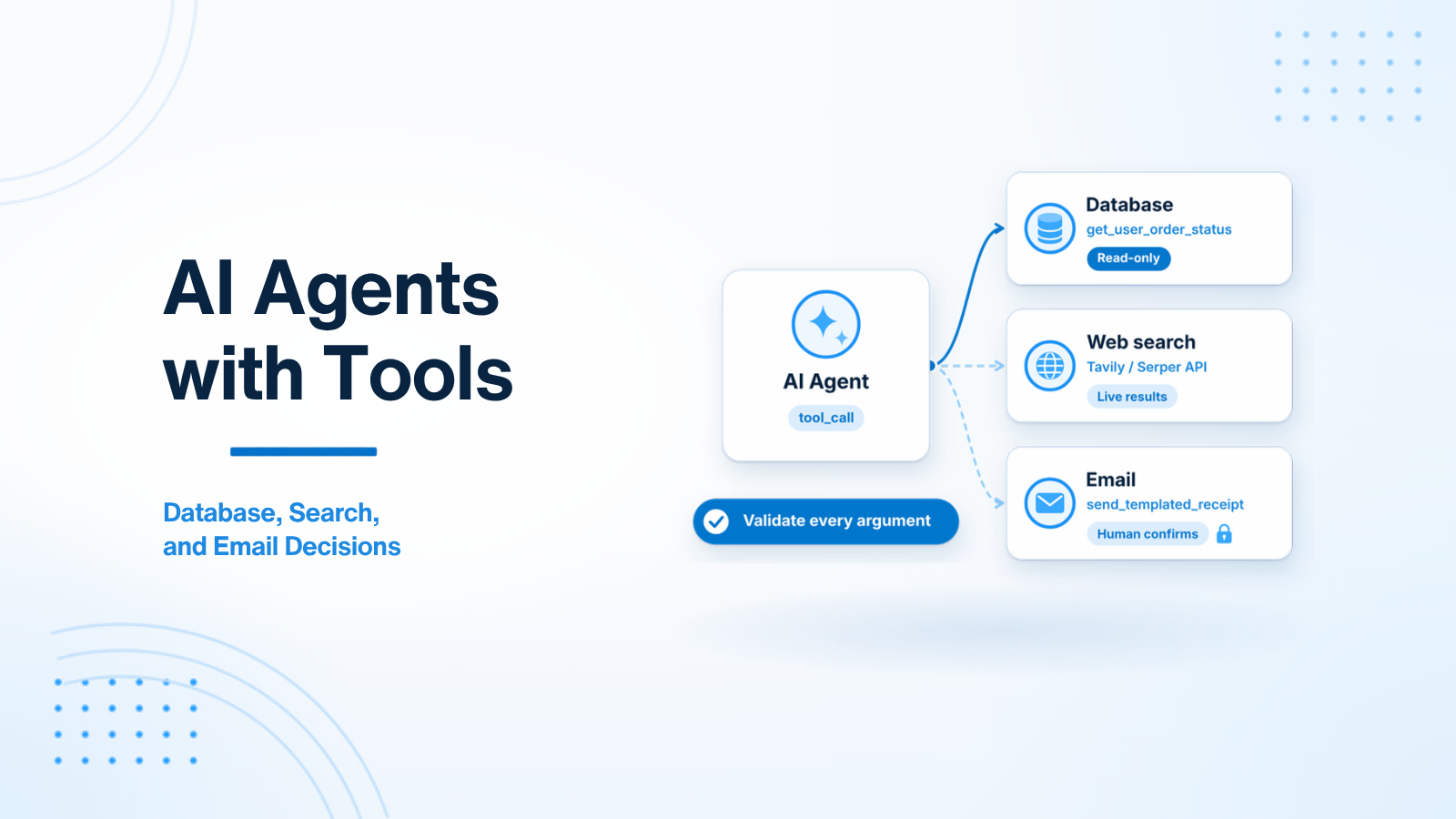
An AI agent is an LLM that can take actions, not only write text. It can ask your backend to look up a database row, search the web, prepare a customer email, or call another API. The model never runs those tools itself. Your application does.
That split is what makes tool calling useful, and what makes it risky. If you pass model-generated arguments straight into a query, or let an agent send email on its own, you inherit every mistake the model makes. This guide has nine parts: how the tool-calling loop works; three tools you are likely to ship (a scoped database lookup, an email draft that waits for confirmation, and a web search call); then SQL guardrails, safety principles, error recovery, background execution, and the telemetry and limits that keep an agent from running away. For a Laravel-specific rollout path around the same concerns, see Adding AI Features to an Existing Laravel SaaS: A Safe Rollout Plan.
1. How tool calling works under the hood
A common misconception is that the language model connects to your database or executes code. It does not. The model only chooses a tool and proposes arguments. Your backend validates those arguments and runs the tool.
The tool-calling lifecycle
- Tool definition. Your application sends the user prompt to the model API together with a JSON Schema list of tools: each tool's name, description, and parameters.
- Model decision. The model reads the prompt and decides whether a tool is needed. If it is, it stops writing a normal answer and returns a structured payload, such as a call to
get_account_balancewith{"user_id": 42}. - Application execution. Your backend receives that payload, treats the arguments as untrusted input, runs the actual query or API call, and collects the result.
- Second model call. You send the tool result back to the model. The model reads it and writes the final reply the user sees.
The same loop can repeat if the model asks for another tool. That is why the iteration limit in section 6 matters. OpenAI API Developer Guide for Product Teams covers the API shape of this exchange in more detail.
2. Example 1: A database lookup tool in Laravel
Start with a narrow tool, not a generic "run any query" tool. The example below looks up one order's status for the signed-in user. The important line is the extra where('user_id', auth()->id()) filter: the model may propose any order_id, but the query still has to stay inside the current user's rows.
// 1. Define Tool Schema sent to OpenAI
$tools = [
    [
        'type' => 'function',
        'function' => [
            'name' => 'get_user_order_status',
            'description' => 'Retrieves the current order status and shipping tracking link for a given order ID.',
            'parameters' => [
                'type' => 'object',
                'properties' => [
                    'order_id' => ['type' => 'integer', 'description' => 'The numeric order ID'],
                ],
                'required' => ['order_id'],
            ],
        ],
    ],
];

// 2. Initial API Call
$response = $openAi->chat()->create([
    'model' => 'gpt-4o',
    'messages' => $messages,
    'tools' => $tools,
]);

// 3. Handle Tool Call Decision
$message = $response->choices[0]->message;

if (!empty($message->toolCalls)) {
    $toolCall = $message->toolCalls[0];
    $functionName = $toolCall->function->name;
    $arguments = json_decode($toolCall->function->arguments, true);

    if ($functionName === 'get_user_order_status') {
        // Backend Executes Database Query (with Tenant Authorization check!)
        $order = Order::where('id', $arguments['order_id'])
            ->where('user_id', auth()->id()) // Mandatory Security Filter!
            ->first();

        $resultPayload = $order
            ? json_encode(['status' => $order->status, 'tracking_url' => $order->tracking_url])
            : json_encode(['error' => 'Order not found or unauthorized']);

        // 4. Return Tool Result to Model for Final Response Generation
        $messages[] = $message; // Assistant tool call message
        $messages[] = [
            'role' => 'tool',
            'tool_call_id' => $toolCall->id,
            'content' => $resultPayload,
        ];

        $finalResponse = $openAi->chat()->create([
            'model' => 'gpt-4o',
            'messages' => $messages,
        ]);

        echo $finalResponse->choices[0]->message->content;
    }
}
If the row is missing or belongs to someone else, the tool returns an error payload rather than leaking that the order exists. In a multi-tenant app, scope by organisation as well as user; Multi-Tenant AI SaaS: Isolation, Quotas, and Boundaries walks through that boundary. For a wider Laravel integration pattern, see Laravel AI Developer Guide: OpenAI, RAG, and Safe Rollouts.
3. Example 2: An email tool that waits for confirmation
Tools that send email, charge a card, or delete data are irreversible once they succeed. Do not let the model execute them directly. Three application-level rules help:
- Keep the tool narrow. Offer
draft_templated_receipt, notsend_any_email. A template limits the subject, recipient, and body the model can influence. - Authorize in the application. Check that the signed-in user may act on the order or account in the arguments. Do not trust a user id the model proposed.
- Require a person to confirm before send. The tool only creates a draft. A confirm action, triggered by a button in your UI, is what actually calls the mailer. Optionally run the draft body through a moderation check before you show it.
The tool returns a draft id and a pending-confirmation status. The model can tell the user the receipt is ready to review. It cannot send it.
// Tool schema sent to the model. This tool creates a draft only.
$tools = [
    [
        'type' => 'function',
        'function' => [
            'name' => 'draft_templated_receipt',
            'description' => 'Prepares a receipt email for an order. The email is not sent until a person confirms it.',
            'parameters' => [
                'type' => 'object',
                'properties' => [
                    'order_id' => ['type' => 'integer', 'description' => 'The numeric order ID'],
                ],
                'required' => ['order_id'],
            ],
        ],
    ],
];

class DraftTemplatedReceiptTool
{
    public function execute(array $arguments, User $actor): array
    {
        $validated = validator($arguments, [
            'order_id' => 'required|integer',
        ])->validate();

        $order = Order::query()
            ->where('id', $validated['order_id'])
            ->where('organization_id', $actor->organization_id)
            ->first();

        if (!$order || $actor->cannot('email', $order)) {
            return ['error' => 'Order not found or unauthorized'];
        }

        $draft = OutboundEmailDraft::create([
            'order_id' => $order->id,
            'organization_id' => $actor->organization_id,
            'to' => $order->customer_email,
            'subject' => "Receipt for order #{$order->id}",
            'body' => view('mail.receipt', ['order' => $order])->render(),
            'status' => 'pending_confirmation',
            'created_by' => $actor->id,
        ]);

        return [
            'draft_id' => $draft->id,
            'status' => 'pending_confirmation',
            'message' => 'Draft saved. A person must confirm before the email is sent.',
        ];
    }
}

// Triggered only by a person clicking Confirm in the UI — not by the model.
public function confirmAndSend(OutboundEmailDraft $draft)
{
    $this->authorize('send', $draft);

    if ($draft->status !== 'pending_confirmation') {
        abort(422, 'This draft is not waiting for confirmation.');
    }

    Mail::to($draft->to)->send(new ReceiptMail($draft));

    $draft->update([
        'status' => 'sent',
        'sent_at' => now(),
        'sent_by' => auth()->id(),
    ]);

    return back()->with('status', 'Receipt sent.');
}
The confirm action should be a normal HTTP request from your UI, with a policy or gate, not a second tool the model can call. For chat UIs that present this kind of approval step, see React AI Developer: Chat UIs, Streaming, and Tool Calling UX.
4. A web search tool
A standard model cannot browse the web on its own. If the agent needs recent news, a current price, or another live fact, your backend has to call a search API and return the results as tool output. APIs built for this kind of retrieval, such as Tavily or Serper, are a common choice.
// Example: Tavily Web Search Tool in PHP/Laravel
class WebSearchTool
{
    public function execute(string $searchQuery): array
    {
        $response = Http::withToken(config('services.tavily.key'))
            ->post('https://api.tavily.com/search', [
                'query'                  => $searchQuery,
                'search_depth'           => 'advanced',
                'include_answer'         => true,
                'max_results'            => 3,
            ]);

        if ($response->successful()) {
            return $response->json('results');
        }

        return ['error' => 'Web search request failed'];
    }
}
Treat search results as untrusted text, the same way you treat user input. They can contain prompt-injection attempts or pages you would not want copied into an email. Pass only the fields you need, cap the number of results, and do not let a search result trigger a second high-impact tool without the same checks you would apply to a person. Securing AI Features: PII and Prompt Injection Basics covers that class of risk.
5. SQL query tools with read-only guardrails
The lookup in section 2 is a fixed query with bound parameters. That is the safer default. Sometimes product teams want a broader tool so a user can ask something like "show me customer churn by plan last month." Once the model is composing SQL, the risk changes: injection, a DELETE or DROP, or a heavy query that ties up the primary database.
If you do offer a SQL tool, put these guardrails in the application, not in the prompt:
- A dedicated read-only connection. Point the tool at a replica, and use a database user that can only run
SELECT. - A statement timeout. Abort queries that run too long — a few seconds is a reasonable starting point, for example three seconds — so a bad plan cannot sit on the database.
- A hard row cap. Append a
LIMITin the application (for example, 100 rows) before you execute the statement, even if the model already wrote one. - Schema exclusion. Do not send table definitions for secrets or credentials, such as password hashes, OAuth tokens, or billing keys, to the model in the first place.
Prefer wrapping common questions as named tools with fixed queries, like the order-status example, and reserve free-form SQL for internal, read-only analytics where the blast radius is smaller.
6. Five safety principles for production agents
- Treat tool arguments as untrusted input. Validate them with a Form Request in Laravel or a Pydantic model in Python before they touch a query or an HTTP client. Check types, allowed keys, and ranges. The model's JSON Schema is a hint to the model, not a security boundary.
- Enforce a hard iteration limit. Cap how many tool calls you will run in one turn — five is a reasonable starting point — so a confused or looping agent cannot keep spending tokens and hitting APIs.
- Keep a complete audit log. Store the tool name, arguments, result (redacted if needed), duration, and the user or session that triggered the turn. You will need this when something goes wrong.
- Give the agent the least privilege it needs. Expose only the tools required for the current task. A receipt helper does not need a refund tool or a raw SQL tool.
- Require human confirmation for high-impact actions. Sending email, moving money, or deleting data should wait for an explicit click in your UI, as in section 3.
These principles overlap on purpose. Validation without authorization still leaks data; a confirmation step without an audit log is hard to reconstruct later. MCP for Product Engineers: Tools, Boundaries, and Safe Integrations discusses the same least-privilege idea when tools are exposed through a protocol rather than a single app.
7. Recover from bad tool calls
Models will sometimes emit invalid arguments, malformed JSON, or a tool name you do not have. Do not turn that into an uncaught exception that breaks the request.
When validation fails, append a short system message to the thread and let the model retry inside your iteration limit. A useful message is specific: "Tool 'get_invoice' expected argument 'invoice_id' as an integer, but received the string 'latest'. Please correct the type and retry." The model can often fix the call on the next turn. If it still fails, stop and tell the user you could not complete the action, rather than retrying without a cap.
8. Run slow tools in the background
Some tools take several seconds: generating a PDF, running a heavy report, or calling a third-party scraper. If you run those calls inside the same request as the model loop, you hold a web worker open and risk a timeout.
Dispatch the slow work to a queue, then either:
- return a tool result immediately, such as a job id and an "in progress" status, so the model can tell the user the work has started, or
- resume the agent when the job finishes, using the job output as the next tool result.
The right choice depends on whether the user can wait. In Laravel, this is the same queue habit you would use for any other slow I/O; Laravel Queue Architecture for Production Backends is a practical reference.
9. Telemetry, audit logs, rate limits, and circuit breakers
Once an agent can call tools on its own, ordinary error logs are not enough. You need to see the path it took.
Log every turn: the conversation state or a reference to it, the tool name, the arguments, the return value, the duration, and a timestamp, in an append-only table. Give support and security engineers a simple timeline view of those events so they can see why the agent picked the wrong tool or the wrong row. Redact PII in anything a person can browse.
A small internal dashboard helps operations as well: active turns, how often each tool is called, latency, error rate, and token cost per tool. Cost spikes are often a retry loop or a single noisy tenant; Controlling AI Costs in SaaS: Tokens, Caching, and Budget Alerts goes further on budgets, and Observability for AI Features: Logs, Traces, Tokens, and Quality Signals covers traces and quality signals in more depth.
Put a rate limit on tool execution per user, session, or tenant, so a looping agent or a hostile client cannot burn through API credit or database time. Add a circuit breaker too: if a tool or provider starts failing above a threshold you choose, stop calling it for a short period and return a clear fallback, rather than retrying in a tight loop.
Summary
Tool-using agents are useful because your backend, not the model, runs the tools. Keep tools narrow, validate and authorize every argument, confirm irreversible actions in the UI, run generated SQL only through a read-only, time-limited path if you offer it at all, recover from bad calls with a hard retry cap, push slow work onto a queue, and watch the audit trail, cost, and error rate. None of these steps is a guarantee on its own. Together, they let you give an agent access to a database, search, and email without handing it the keys to the application.
If you are designing an agent or a function-calling integration, get in touch.

Prakash Tank
Full-Stack Architect & Tech Enthusiast. Passionate about building scalable applications and sharing knowledge with the community.